Motivation
Someone came up to me and said, “Let’s make some blogs!” At first, my reaction was …

Ok, then, to do that, my instinct was to run the other way. Anything to avoid being trapped in the world of WordPress themes or WIX wizardry. Instead, I dusted off my terminal, grabbed a cup of cocoa, and dove into Hugo-a lightning-fast static site generator that lets me control every pixel. For hosting, no pricey managed platforms, just a trusty Microsoft Azure Blob Storage account, letting me deploy and update with just a push. Now, my blog is blazing fast, totally customizable, and blissfully free of cookie-cutter templates. Who knew building websites could actually be empowering (and kind of fun)?
This tutorial guides you through creating a blog using Hugo, a fast and flexible static site generator, and deploying it with Microsoft Azure Blob Storage.
Prerequisites
- Install Hugo
- Install Git
- Have an active Microsoft Azure account with Blob Storage setup
- Basic command-line and text editor familiarity
Install Hugo Tips
With snap (for Ubuntu)
To install Hugo with snap, run:
sudo snap install hugo
With mamba (miniforge system)
Personally, I prefer using mamba for package management across multiple-projects. Because it’s much faster and less prone to dependency resolution issues. Also, if you’re working in a commercial or government environment, don’t install Anaconda unless your organization has actually purchased a license—otherwise, you could be violating terms of use. Community packages like mamba are free for anyone to use without commercial restrictions.
To install Hugo using mamba CLI starting from creating a conda environment, you can follow these steps:
Create a new conda environment:
mamba create -n hugo_env -y
Activate the new environment:
mamba activate hugo_env
Install Hugo using mamba from the conda-forge channel:
mamba install -c conda-forge hugo -y
This sequence sets up a mamba environment and installs Hugo efficiently.
Create a New Hugo Site
Open your terminal and run:
hugo new site mlablogs
cd mlablogs
git init
This sets up a fresh Hugo project.
Add a Theme
Choose a theme from the Hugo themes repository. For example, add the Ananke theme:
git submodule add https://github.com/adityatelange/hugo-PaperMod.git themes/PaperMod
echo 'theme = "PaperMod"' >> config.toml
You can find more themes on .
You can also change the theme later by editing
config.toml,
and don’t forget to verify your submodules in .gitmodules if you need to remove or add more themes.
Add Content
Create your first blog post:
mkdir -p content/posts/hello-hugo
nano content/posts/hello-hugo/index.md
Edit this Markdown file and add your text.
+++
date = '2025-11-03T12:00:00+09:00'
draft = false
title = 'Hello Hugo'
+++

## Hello Hugo!

Hello Hugo!
Preview Locally
Run:
hugo server
Visit http://localhost:1313 to see your site live locally.
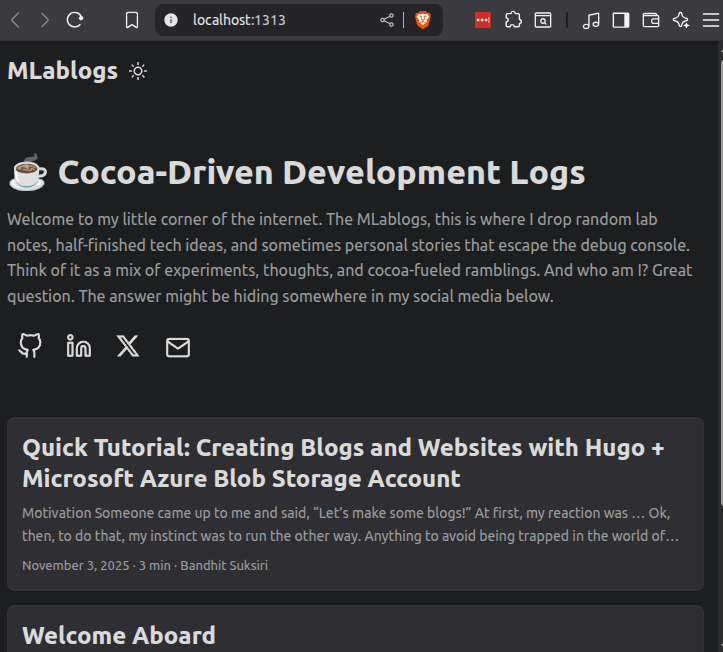
Very simple, isn’t it?
Build the Site
Generate static files:
hugo
Static files output to the public directory.
Deploy to Azure Blob Storage
- Create a Blob Storage container in Azure Portal and set it for static website hosting.
- Use Azure CLI or Azure Storage Explorer to upload the contents of the
publicfolder to the$webcontainer. - Configure your storage account’s static website endpoint as your site URL.
There you have it
There you have it. Now you know it… no refunds if it stops working!